Single sign-on for your company’s AI, with Microsoft Entra ID
Standard Compute gives your people Claude, GPT, Gemini and leading open models through one company account. They sign in with their work identity, and access to Claude Desktop and Claude Code follows your Microsoft Entra groups.
- Can we use SSO with Microsoft Entra ID?
- Connect Microsoft Entra ID or any SAML identity provider so your people sign in to Standard Compute with their work accounts. Anyone on your verified domain joins your company automatically.
- Can employees sign in to Claude with a Microsoft work account?
- Employees sign in to Claude Desktop and Claude Code with their Microsoft work account, through our EU gateway, so there are no API keys to hand out. Access follows your Microsoft Entra groups through SCIM provisioning.
- Who sets it up?
- A company administrator sets it up in the Standard Compute dashboard together with your Microsoft Entra admin. An IT partner can do it on your behalf in your own tenant.
Two kinds of sign-in, one company account
Website single sign-on is for the Standard Compute dashboard. Your people choose Continue with SSO, sign in through Microsoft Entra ID or any other SAML identity provider, and join your company as members. Everyone on your verified email domain lands in the right company without an invitation.
Claude work-account sign-in is for Claude Desktop and Claude Code. Employees choose Sign in with your organization in Claude and use their Microsoft work account. Requests go through our EU gateway, which terminates TLS and runs in Finland. Your Entra groups decide who is admitted, through SCIM provisioning, and each employee gets their own company key with its own budget.
Both run inside your own Microsoft tenant. Employees stay in your directory and nobody needs an account in a Standard Compute tenant.
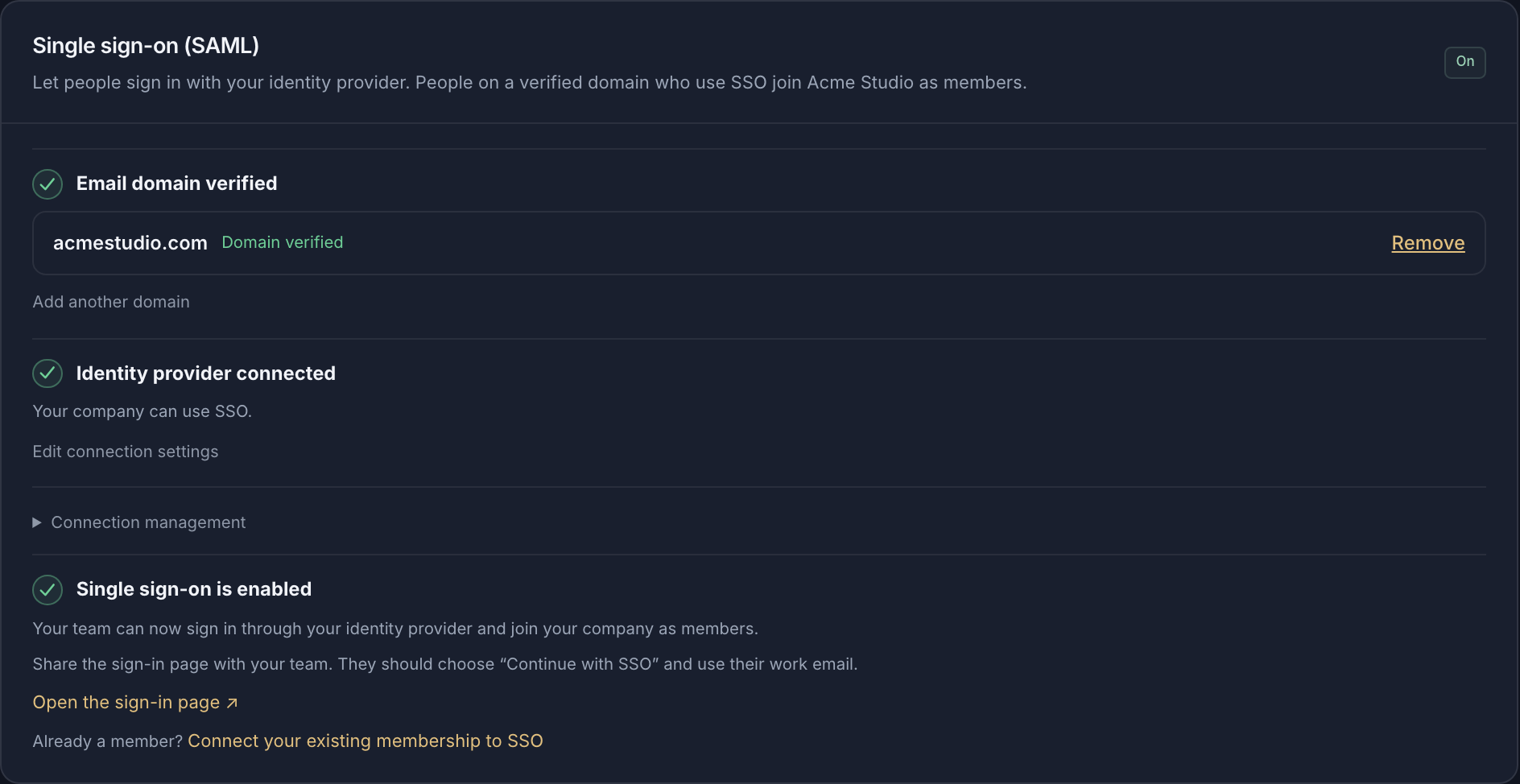
Set up single sign-on in four steps
In the dashboard, open Resources, then Single sign-on (SAML).
Verify your domain
Add your work email domain and create the DNS TXT record shown in the dashboard. Your MX records stay as they are.
Create a SAML application in Microsoft Entra
In the Microsoft Entra admin center, create an enterprise application with SAML sign-on and paste the Entity ID and the reply (ACS) URL that Standard Compute shows you.
Connect and test
Copy the application’s App Federation Metadata URL into Standard Compute and choose Test sign-in with an ordinary member account.
Enable
Choose Enable SSO. Your people open the sign-in page, choose Continue with SSO and use their work email.
Let employees sign in to Claude with their work account
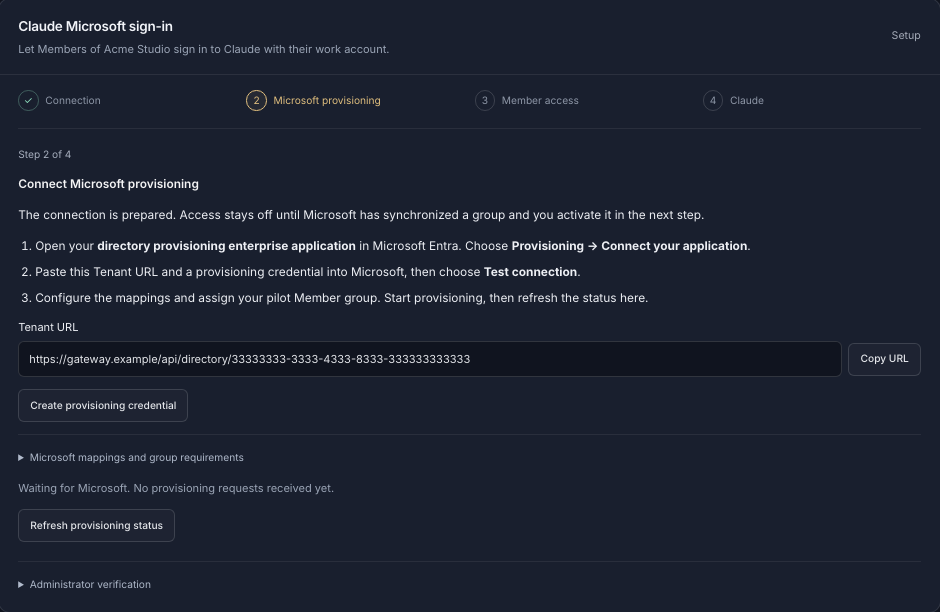
In the dashboard, open Resources, then Claude Microsoft sign-in. The page walks you through four stages: connection, Microsoft provisioning, member access and Claude.
Register two apps in Microsoft Entra
One app registration for the gateway API with a delegated inference scope, and one for the Claude desktop client. No client secret is created or distributed.
Prepare the connection
Enter your tenant ID and the two application IDs in Standard Compute and choose Prepare connection.
Connect Microsoft provisioning
Create a provisioning application in Entra, paste the tenant URL and provisioning credential from Standard Compute, then choose the Entra groups whose members get access.
Activate and roll out Claude
Activate access and add the generated connection settings to your managed Claude configuration in Intune or your device management tool. Employees open Claude and choose Sign in with your organization.
What single sign-on covers
| Capability | What it does | Set for |
|---|---|---|
| Dashboard single sign-on | Microsoft Entra ID or any SAML identity provider, such as Okta | Set for: Company |
| Verified-domain join | Anyone on your verified email domain who signs in with SSO joins your company as a member | Set for: Company |
| Claude Desktop and Claude Code | Sign in with a Microsoft work account, no API keys to hand out | Set for: Company |
| Group-based access | Microsoft Entra groups decide who is admitted, through SCIM provisioning | Set for: Company |
| EU gateway | Work-account sign-in runs through our gateway in Finland | Set for: Company |
| A key per employee | Each employee gets their own company key, budget and usage history | Set for: Person |
| Admin roles | Admin and member roles in Standard Compute, separate from Entra admin roles | Set for: Company |
| Audit | Domain verification and SSO changes appear in the admin audit log | Set for: Company |
Questions from IT, security and finance
- Can I log into Claude with my Microsoft account? Our company uses Entra ID and people keep asking.
- Yes. With Standard Compute, employees sign in to Claude Desktop and Claude Code with their Microsoft work account through our EU gateway, and access follows your Microsoft Entra groups through SCIM provisioning.
- We need SSO with Microsoft Entra for all our AI tools (Claude, ChatGPT, API access). Is there one platform that does it with SCIM provisioning?
- Standard Compute gives your people Claude, GPT, Gemini and open models through one company account. They sign in with Microsoft Entra ID or any SAML identity provider, and Claude Desktop and Claude Code access follows your Entra groups through SCIM.
- Okta SSO for LLM API keys: how do enterprises stop devs from using personal OpenAI keys and tie usage to corporate identity?
- Connect Okta or any other SAML identity provider so people sign in with their work account, then give every person and every app its own company key. All usage then runs through keys your company owns, each with its own budget.
- AI gateway with Entra ID SSO and per-user API keys so we can offboard people instantly. Recommendations?
- Standard Compute connects to Microsoft Entra ID and gives every person their own company key, which an admin can revoke at any time. For Claude Desktop and Claude Code, access follows your Entra groups through SCIM provisioning.
- Can employees sign in to Claude with a Microsoft account? We have Entra ID and want SSO for everyone.
- Employees sign in to Claude Desktop and Claude Code with their Microsoft work account, and your administrator chooses which Entra groups are admitted. Website sign-in for the dashboard uses the same Entra tenant through SAML.
- Claude Code SSO with Azure AD: is that only on an enterprise plan? We’re 25 people.
- Any company workspace can add single sign-on, whatever its size. Azure AD is now Microsoft Entra ID, and your 25 people sign in to Claude Code with their work accounts, each on their own key and budget.
- Is there a way to sign in to AI tools with Microsoft Entra SSO for the whole company, both chat and API?
- Your people sign in to the Standard Compute dashboard with Entra SSO and use Claude Desktop and Claude Code with their Microsoft work account. Applications use company API keys under the same account and the same rules.
- Do employees need accounts in a Standard Compute Microsoft tenant?
- No. Everything runs in your own Microsoft tenant, and employees stay in your directory.
For your security review
The full picture of what Standard Compute offers companies is on the enterprise overview. What we store, where it is stored and how it is protected is on the security page, with the sub-processor list and the DPA next to it.
Create your company workspace, verify your domain and connect Microsoft Entra ID from the dashboard.
Create a company workspaceor write to contact@standardcompute.com