Frontier and open-source models through one gateway, under your company’s rules
Standard Compute is the AI gateway for companies and regulated teams. Your people and applications get Claude, GPT, Gemini and leading open models through one API, at the lowest cost each task allows, with the controls your security review asks for.
Create a company workspaceor write to contact@standardcompute.com
Each step goes to the cheapest model that can do it
A single API gives you frontier and open-source models, and it routes each step to the cheapest model that can do it and the cheapest provider fast enough to serve it.
Agents and internal tools make many calls, and most of them are routine. Reading a file or classifying a ticket goes to a model priced for that work. The hard reasoning step goes to a frontier model. For every model, the request is served by the cheapest provider that meets the latency and tokens-per-second bar for the job.
Read how this works for API teams and for Claude Code teams.
If your team keeps hitting limits, see Claude rate limits for teams and Amazon Bedrock Claude quotas and throttling.
Control stays with your company
Rules are set for the company, a team or a single key. A lower level can narrow a rule set above it and never loosen it.
Processing in Europe
Set a Europe rule for your company, a team or a single key, and every request, including retries and fallbacks, is served only by approved European inference endpoints. If no European endpoint can serve it, the request is refused before your prompt is sent.
Our EU gateway terminates TLS and runs in Finland, and your account data is stored in Frankfurt. Request records hold metadata only (model, provider, tokens, cost and status), never your prompts or outputs.
Retention and training
Turn on zero data retention for your company, a team or a key, and every request is routed only to inference endpoints that commit to keeping no copy of your data. Teams and keys inherit the requirement and can never switch it off underneath you.
We process your prompts in memory to serve each request and never write them to storage or logs. Standard Compute never trains on your prompts or outputs. With a region rule or zero retention turned on, every request goes only to providers that commit not to train on it.
Sign-in
Connect Microsoft Entra ID or any SAML identity provider so your people sign in to Standard Compute with their work accounts. Anyone on your verified domain joins your company automatically.
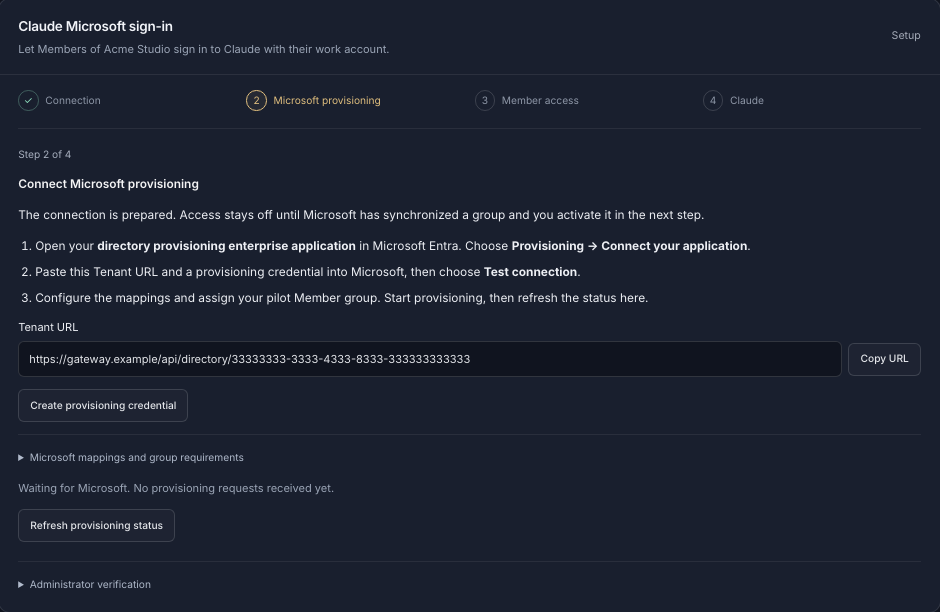
Employees sign in to Claude Desktop and Claude Code with their Microsoft work account, through our EU gateway, so there are no API keys to hand out. Access follows your Microsoft Entra groups through SCIM provisioning.
Teams, keys and budgets
Organize your company into teams, invite colleagues by email, and give every person and every app its own key, all under one company account.
Every person and app gets a fixed monthly budget that never overruns, and you can set spending caps per key and for the whole company. Optional top-off from a prepaid company balance keeps critical agents running.
Providers and models
Choose exactly which inference providers may handle your data, for the whole company, a team or a single key. Lower levels can only narrow the rules, new providers are never added without an admin’s approval, and fallbacks can never route around your list.
Decide which models each key can use, so every app and every team member gets exactly the models you approve. That is how open models go to the applications you choose and frontier models to the ones that need them.
Records
Every admin change is recorded with before and after values, and you can export a record of every request showing the model, the provider that served it and the region rule in force, kept for 12 months.
Claude Code for the whole team
Point Claude Code and Claude Desktop at Standard Compute and your team stops hitting 5-hour and weekly caps: agents run until the monthly budget is used. Claude is served across several clouds, so one provider’s quota or outage doesn’t stop your work.
If a provider goes down, your request fails over to another approved provider of the same model automatically, without leaving your region or provider rules.
What you can set, and at which level
| Capability | What it does | Set for |
|---|---|---|
| Model routing | Each step goes to the cheapest model that can do it and the cheapest provider fast enough to serve it | Set for: Key |
| Frontier and open models | Claude, GPT, Gemini, GLM, DeepSeek, MiniMax and Kimi through one API | Set for: Key |
| Europe rule | Requests, retries and fallbacks served only by approved European inference endpoints | Set for: Company, team, key |
| Zero data retention | Requests routed only to endpoints that keep no copy of your data | Set for: Company, team, key |
| No training | Standard Compute never trains on prompts or outputs | Set for: Always |
| Single sign-on | Microsoft Entra ID or any SAML identity provider | Set for: Company |
| Claude work-account sign-in | Claude Desktop and Claude Code with a Microsoft work account, groups through SCIM | Set for: Company |
| Teams and keys | A key for every person and every app | Set for: Company, team |
| Budgets | Fixed monthly budget per key that never overruns, plus spending caps per key and company | Set for: Key, company |
| Provider allow-list | Only the inference providers you approve; new providers need an admin | Set for: Company, team, key |
| Model allow-list | Only the models you approve for each app or person | Set for: Key |
| Admin audit log | Every admin change with before and after values | Set for: Company |
| Request log export | Model, serving provider and region rule for every request, kept for 12 months | Set for: Company |
| Data Processing Agreement | Signed in the dashboard | Set for: Company |
| Sub-processor list | Public, with 14 days’ notice before a new one is added | Set for: Public |
| Claude Code usage | No 5-hour or weekly caps; runs until the monthly budget is used | Set for: Key |
How a security review goes with us
Read our security overview
The security page covers what we store, where it is stored, encryption, access control and the controls described above.
Check the sub-processors
We publish every sub-processor with its purpose, data and location, and give you 14 days’ notice before adding a new one. The list is at /sub-processors.
Sign the DPA
Sign our Data Processing Agreement in the dashboard in minutes. It commits us to no training on your data, no retention of your content, and breach notification within 72 hours. Read the full text first at /dpa.
Send us your questionnaire
Send security questionnaires and anything else your reviewer needs to contact@standardcompute.com.
Common questions from IT and procurement
- Does Claude Code have rate limits on Standard Compute?
- Claude Code and Claude Desktop on Standard Compute have no 5-hour or weekly caps, so agents run until the key’s monthly budget is used.
- Can we keep AI processing in Europe?
- With a Europe rule on your company, a team or a key, every request, including retries and fallbacks, is served only by approved European inference endpoints, and a request no European endpoint can serve is refused before your prompt is sent.
- Does Standard Compute support SSO with Microsoft Entra ID?
- Standard Compute connects to Microsoft Entra ID or any SAML identity provider, so your people sign in with their work accounts while anyone on your verified domain joins your company automatically.
- Can employees sign in to Claude Code with a Microsoft work account?
- Employees sign in to Claude Desktop and Claude Code with their Microsoft work account through our EU gateway, and access follows your Entra groups through SCIM provisioning.
- What happens when an AWS Bedrock quota for Claude runs out?
- On Standard Compute, Claude is served across several clouds, so one provider’s quota or outage doesn’t stop your team’s work.
- Can a business use open-source models?
- GLM, DeepSeek, MiniMax and Kimi run alongside Claude, GPT and Gemini through one API, and GLM, DeepSeek and MiniMax are also served by European providers for Europe-restricted workspaces.
- Does Standard Compute train on our data?
- Standard Compute never trains on your prompts or outputs, and with a region rule or zero retention turned on, every request goes only to providers that commit not to train on it.
- Is there a Data Processing Agreement?
- You sign our Data Processing Agreement in the dashboard, and it commits us to no training on your data, no retention of your content and breach notification within 72 hours.
- How do we control AI spend across the company?
- Every person and app gets its own key with a fixed monthly budget that never overruns, and you can set spending caps per key and for the whole company.
Set up your company, invite your team and connect your identity provider from the dashboard.