Short answers
On the Claude Team plan, every member has their own usage limit: a five-hour session limit and a weekly limit, shared across claude.ai, Claude Desktop and Claude Code, which can't be pooled or moved to another member.
A Standard Team seat gets 1.25x the Pro plan's per-session allowance and a Premium seat gets 6.25x; Anthropic does not publish either allowance as a number of messages or tokens.
Usage-based Claude Enterprise has no plan or seat-level usage limits: every token is billed at API rates, and admins control cost with spend limits.
Point Claude Code and Claude Desktop at Standard Compute and your team stops hitting five-hour and weekly caps: agents run until the monthly budget is used. Claude is served across several clouds, so one provider's quota or outage doesn't stop your work.
The limits by plan
| Plan and seat | Anthropic list price | Usage limit | When a member reaches it |
|---|---|---|---|
| Team, Standard seat | $20 a month billed annually, $25 monthly | 1.25x the Pro plan's per-session allowance, plus a weekly limit across all models | Wait for the reset, or continue on usage credits if an admin has turned them on |
| Team, Premium seat | $100 a month billed annually, $125 monthly | 6.25x the Pro plan's per-session allowance, plus a weekly limit across all models | Wait for the reset, or continue on usage credits |
| Enterprise, usage-based | $20 per seat a month billed annually, 20-seat minimum, plus usage at API rates | No plan or seat-level usage limits | Usage continues and is billed at API rates, within any spend limits admins set |
| Enterprise, seat-based (older contracts) | Per contract | Standard and Premium seats with per-seat limits | Usage credits if enabled; Anthropic says this billing model ends at the next contract renewal |
How the limits behave
- The five-hour window starts with a member's first message and resets in full five hours later.
- The weekly limit resets at a fixed time each week that Anthropic assigns to the account. Each member sees both under Settings > Usage.
- Limits are per member. On Team, Anthropic says usage limits can't be transferred or shared between team members, so an idle seat's allowance can't help a busy one.
- One allowance covers every surface. Usage on claude.ai, Claude Desktop and Claude Code counts toward the same limit, and Claude Code's documentation says the seat allowance is shared with chat and Cowork.
- The session and weekly limits apply across all models, so switching with
/modeldoesn't restore access. A model-specific message such as "You've hit your Opus limit" is different: switching to another model family keeps the developer working. - Anthropic says it may adjust usage limits at its discretion.
Why companies hit them
Coding agents use a seat far faster than chat does. Anthropic's own guidance to admins is to budget more for a coding seat than a chat seat, because each Claude Code turn carries file contents, tool calls and multi-step reasoning, and one debugging session can consume more than a day of chat.
- Claude Code sends the full conversation with every request, so a session left open all day keeps drawing on the allowance for its whole history.
- Subagents and agent teams send their own requests on top of the main session. Anthropic puts agent teams at roughly 7x the tokens of a standard session when teammates run in plan mode.
- The first message after a break longer than the cache lifetime reprocesses the full context.
- Scheduled loops and background check-ins can fire while a session sits idle.
- Usage is uneven across a team. The two developers running long refactors hit the window while allowance on lighter seats goes unused, and it can't be moved to them.
Your options within Anthropic's plans
| Option | What it changes | What stays the same |
|---|---|---|
| Premium seats for heavy users | Five times the usage of a Standard seat | Each member still has a five-hour and a weekly window |
| Usage credits | Members keep working past the limit; admins set spend limits for the organization, a group or a member | Overflow is billed separately, and Team's monthly API credits can't be used for it |
| Usage-based Enterprise | No seat-level limits; every token is billed at API rates | $20 per seat a month, billed annually, with a 20-seat minimum |
| Claude API organization | Per-token billing with organization-level rate limits instead of seat windows | Requests and tokens per minute are shared by the whole organization |
| Claude on Amazon Bedrock | Usage billed to your AWS account under Bedrock quotas | Per-model, per-Region token quotas and ThrottlingException |
If you move Claude Code to an API organization, Anthropic publishes a sizing table for the rate limits to request. The limits apply to the organization as a whole, so one developer can briefly use more than their share while others are idle.
| Team size | Tokens per minute per user | Requests per minute per user |
|---|---|---|
| 1 to 5 users | 200k to 300k | 5 to 7 |
| 5 to 20 users | 100k to 150k | 2.5 to 3.5 |
| 20 to 50 users | 50k to 75k | 1.25 to 1.75 |
| 50 to 100 users | 25k to 35k | 0.62 to 0.87 |
| 100 to 500 users | 15k to 20k | 0.37 to 0.47 |
| 500+ users | 10k to 15k | 0.25 to 0.35 |
Running Claude Code and Claude Desktop through Standard Compute
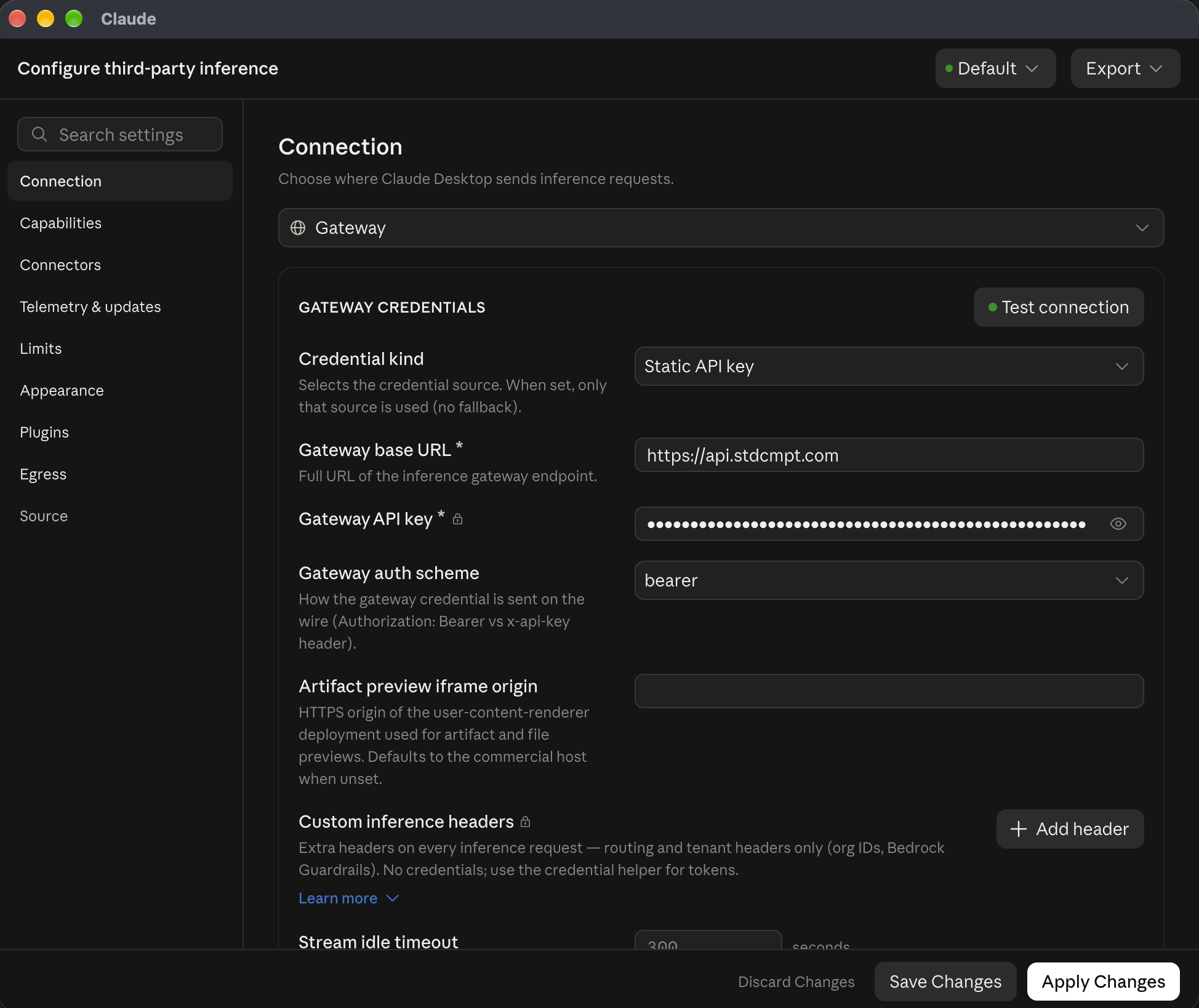
Both apps can send their requests to a gateway instead of a claude.ai seat. Claude Code reads ANTHROPIC_BASE_URL, and Claude Desktop has a Gateway option under Developer > Configure third-party inference for any gateway that implements the Anthropic Messages API. Pointed at Standard Compute, both apps draw on the gateway instead of a seat.
Behind that one endpoint, Standard Compute serves Claude alongside GPT, Gemini and open models such as GLM, DeepSeek, MiniMax and Kimi. Each step goes to the cheapest model that can do it and the cheapest provider fast enough to serve it, judged by latency and tokens per second. When a provider goes down, the request fails over to another provider of the same model automatically.
# No /v1: Claude Code adds /v1/messages
export ANTHROPIC_BASE_URL=https://api.stdcmpt.com
export ANTHROPIC_AUTH_TOKEN=YOUR_KEY
claude
Setup guide for Claude Code. For team costs, see Claude Code for teams; for individual plans, every way to use Claude Code without the weekly limit.
Put your team on Standard Compute
See how a company workspace is set up, or tell us what your team runs today.
Frequently asked questions
What are the Claude Team plan usage limits?
Each Team member has a five-hour session limit and a weekly limit across all models. A Standard seat gets 1.25x the Pro plan's per-session allowance and a Premium seat gets 6.25x. Anthropic does not publish the allowances as message or token counts.
Do Claude Code and Claude Desktop share the same limit as Claude chat?
Yes. Anthropic says usage on claude.ai, Claude Desktop and Claude Code counts toward the same limit, and Claude Code's documentation says the seat allowance is also shared with Cowork.
Can we pool Claude usage across our team?
Not on the Team plan: limits are per member and can't be transferred or shared. Usage-based Enterprise has no seat-level limits and bills all usage at API rates, with spend limits set by admins.
What happens when a team member hits the Claude limit?
They wait for the reset time shown in the message, or keep working on usage credits if an admin has turned them on. Switching models doesn't help with the session or weekly limit, because both apply across all models.
Does Claude Enterprise have usage limits?
Usage-based Enterprise plans have no plan or seat-level usage limits; usage is billed at API rates and capped by spend limits. Older seat-based Enterprise plans keep per-seat limits until their next contract renewal.
How do we stop Claude Code hitting the limit for the whole team?
Move the traffic off the seats. Set ANTHROPIC_BASE_URL in Claude Code and the Gateway option in Claude Desktop to Standard Compute; requests then draw on a monthly budget with no five-hour or weekly window, and Claude stays available when one provider is throttled because other providers serve the same model.
Does a gateway raise our Anthropic plan limits?
No. It replaces the path. Your Anthropic plan and its limits stay as they are for anything still signed in to claude.ai; traffic you route through the gateway is served by the gateway's providers.
Sources (checked 2026-11-07)
- Claude plans and pricingclaude.com
- What is the Team plan?support.claude.com
- What is the Enterprise plan?support.claude.com
- How do usage and length limits work?support.claude.com
- Usage limit best practicessupport.claude.com
- Use Claude Code with your Team or Enterprise plansupport.claude.com
- Claude Code: Manage costs effectivelycode.claude.com
- Deploy Claude Desktop with an LLM gatewayclaude.com