AI assistants and agents at work: the Spanish AEPD's 10‑point guidance
Updated 9 November 2026
On 27 October 2026 Spain's data protection authority, the AEPD, published a 10-point guide to delegating tasks to AI assistants and agents without losing control of personal data. It asks for minimal permissions with no standing authorizations, confirmation before important actions, control over memory, caution with hidden instructions, supervision and a way to stop the agent. At work: only assistants your organization has authorized, and never work data in a personal AI account.
Create a company workspaceor write to contact@standardcompute.com
This page summarizes the guide with links to the official documents, turns each point into what it means for a company and into concrete controls, and shows the technical part an AI gateway handles. It summarizes public guidance and is not legal advice. The original is in Spanish; quotations are our translation.
What does the AEPD say, in short?
- What is the AEPD's guidance on AI assistants and agents?
- A 10-point guide (decálogo) the AEPD published on 27 October 2026 under the title "AI assistants and agents: let AI act for you, not without you". It is addressed to users, adds a section on using agents at work, and lists the controls users can expect from the service provider.
- What does the AEPD ask of people using AI assistants at work?
- Use only assistants authorized by the organization, connect only the accounts, applications and data it has authorized, don't install agents on a work device on your own, and don't connect work email or documents to a personal AI account. When in doubt, ask the organization's data protection officer (DPO).
- Which controls does the AEPD expect from AI agent providers?
- Understandable permissions that separate reading from acting, configurable confirmation for high-impact actions, a history of what the agent has done, an immediate way to stop it, memory management and deletion, clear information on who receives the data and whether it is used to train AI, and a simple way to exercise data protection rights.
What are the ten points?
La AEPD publica un decálogo para delegar tareas en asistentes y agentes de IA sin perder el control sobre los datos personales, AEPD, 27 October 2026
Before delegating, the AEPD suggests five questions: what can the assistant see, what can it remember, what can it do on your behalf, where does it send your data, and does it affect anyone else. The ten points, in order, with their original titles translated:
- Before delegating, check who you are handing the keys to: clearly identified services that let you exercise and defend your rights in the EU and say where data is sent; review privacy, memory and history settings and whether data is used to train models.
- Grant access, not blank cheques: minimum access, read-only where that is enough, only what is needed (one folder, one calendar), and a regular review of what is connected.
- Give it the minimum and protect what is sensitive: the more sensitive the data, the more limited the access and autonomy; no passwords, codes or card numbers in the conversation; remove data a document doesn't need for the task.
- Decide what it can remember about you: use the service's memory, history and privacy controls, temporary chats for sensitive matters, and separate spaces for personal and work use.
- Also tell it what it must not do: who it may write to, how much it may spend, what it must not touch and when to stop and ask. Limits written in the prompt don't replace permissions and confirmations.
- Confirm what matters: prior confirmation to send, publish, share, delete, pay, sign up or accept terms; no "always allow" unless truly needed; no decisions with legal, financial or health consequences without review.
- Also distrust what it reads: websites, emails, PDFs or invitations can carry hidden instructions. No measure removes the risk entirely, so the best protection is limiting what the agent can do if it is tricked.
- Protect other people's data too: consider who else is in each data source, limit the scope, and don't gather or infer sensitive information about others.
- Protect your account and your device: a unique password, two-step verification or a passkey, plug-ins and connectors only from known sources, separate profiles or sessions for sensitive tasks.
- Supervise it, learn to stop it and withdraw its access: know how to stop it before you need to, review the activity history, set alerts, limit scheduled tasks and, if something goes wrong, stop it, disconnect and tell your organization.
What does the guide say about work use and about providers?
Asistentes y agentes de IA. Decálogo para personas usuarias (PDF, Spanish), AEPD, October 2026
- If you use it at work: use only the assistants authorized by your organization and connect only the accounts, applications and data it has authorized. A tool that is fine for personal use is not automatically suitable for work.
- Don't install agents on a work device on your own, and don't connect work email or documents to a personal AI account. Customer, patient, student or citizen data remains the organization's responsibility.
- When in doubt, ask your organization's data protection officer (DPO).
- What you can expect from the provider: responsibility can't rest on the user alone. Whoever offers assistants that can act should also offer permissions that separate reading from acting, configurable confirmation, an action history, an immediate way to stop the agent, memory management and deletion, information on who receives the data and whether it is used for training, and a simple way to exercise rights.
What does each point mean for a company, and which controls meet it?
A practical reading for a company deploying assistants and agents: each point of the guide, what it requires of the organization, and the controls that make it possible.
Choose identified providers
A list of approved assistants and providers, with the company behind each, where data goes, whether it trains on it, and a signed data processing agreement. Control: provider inventory, DPA and sub-processor list.
Minimum access per task
Each agent or app gets its own credential, limited to the models, data and connectors it needs, with a regular review of what is connected. Control: one key per app with approved models, read-only connectors.
Protect sensitive data
Written rules on what never goes into a prompt (health, finance, credentials), and less autonomy the more sensitive the use. Control: AI usage policy and a restriction on where data is processed.
Govern memory and retention
Decide what the service keeps and for how long, and keep personal and work use apart. Control: zero data retention with the inference provider and separate work accounts.
Set limits, including spend
Define who the agent may write to, what it must not touch and how much it may spend. Control: permissions in the agent's tools and a fixed budget per key that can't be exceeded.
Confirmation before acting
Require human approval to send, pay, delete, sign up or accept terms, with no standing authorizations. Control: confirmations configured in the agent tool.
Contain prompt injection
Don't combine untrusted content, access to private data and the ability to act without confirmation in one task. Control: separate reading agents from acting agents, limit the external services they reach.
Respect third parties' data
Before connecting a source (email, CRM, records), consider who else is in it and limit the scope. Control: an impact assessment where required and minimum scope for each connector.
Protect accounts and devices
Sign-in with the work account, two-step verification and approved plug-ins only. Control: single sign-on with the company's identity provider.
Supervise and be able to stop
A history of what each agent has done, alerts, limits on scheduled tasks and a procedure to stop it and withdraw access. Control: request log and admin audit log.
Which part does an AI gateway handle?
Confirmations, memory and each tool's permissions are set in the agent itself, and the internal policy and impact assessment remain the company's work. Standard Compute, an AI gateway to frontier and open-source models, handles the model layer of several points: where prompts go, who keeps them, which models and providers each key may use, how much it may spend, and the record of what happened.
Identified providers
Points 1 and 2. Choose exactly which inference providers may handle your data, for the whole company, a team or a single key. Lower levels can only narrow the rules, new providers are never added without an admin's approval, and fallbacks can never route around your list. We publish every sub-processor and give you 14 days' notice before adding a new one.
Where data goes
Points 1 and 3. Set a Europe rule for your company, a team or a single key, and every request, including retries and fallbacks, is served only by approved European inference endpoints. If no European endpoint can serve it, the request is refused before your prompt is sent.
No retention, no training
Points 1 and 4. Turn on zero data retention for your company, a team or a key, and every request is routed only to inference endpoints that commit to keeping no copy of your data. Standard Compute never trains on your prompts or outputs.
One key per agent
Point 2. Give every person and every app its own key, and decide which models each key can use.
How much it may spend
Point 5. Every person and app gets a fixed monthly budget that never overruns, and you can set spending caps per key and for the whole company.
Work accounts
Point 9 and work use. Connect Microsoft Entra ID or any SAML identity provider so your people sign in with their work accounts. Employees sign in to Claude Desktop and Claude Code with their Microsoft work account, through our EU gateway, and access follows your Microsoft Entra groups through SCIM provisioning.
History
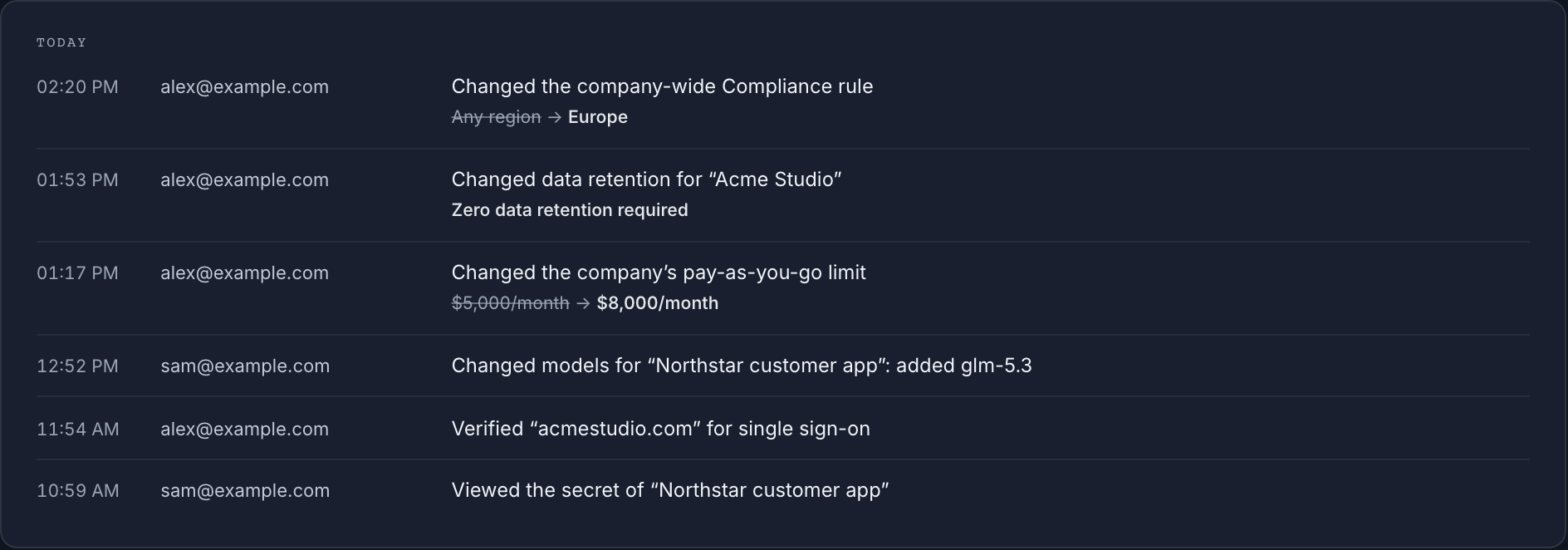
Point 10. Every admin change is recorded with before and after values, and you can export a record of every request showing the model, the provider that served it and the region rule in force, kept for 12 months. Records hold metadata only, never your prompts or outputs.
DPA in the dashboard
Sign our Data Processing Agreement in the dashboard in minutes. It commits us to no training on your data, no retention of your content, and breach notification within 72 hours.
Questions from IT, data protection and security
- Does the AEPD ban AI agents at work?
- No. The guide bans no tool. It asks for assistants authorized by the organization, minimum permissions, confirmation before important actions, and supervision.
- Is the AEPD's guide binding?
- It is a set of recommendations from the AEPD addressed to users. The legal obligations remain those of the GDPR and applicable law; the guide describes how the AEPD expects this technology to be used.
- Does an AI gateway make a company GDPR compliant?
- No. A gateway handles a technical part: where data is processed, retention, approved providers and models, budgets and logs. The legal basis, the impact assessment, information to data subjects, the internal policy and each agent's configuration remain the company's responsibility.
- Does Standard Compute keep the content of requests?
- We process your prompts in memory to serve each request and never write them to storage or logs. Request records hold metadata only: model, provider, tokens, cost and status.
Official sources
Summary based on these documents, read on 9 November 2026. It replaces neither the documents themselves nor legal advice.
Related
Create a company workspace, turn on the Europe rule and zero data retention, and give every agent its own key with a fixed budget.