AI gateway for the public sector, with the documentation a procurement asks for
Standard Compute is the AI gateway public bodies, municipalities and agencies use to give staff Claude, GPT and open models with the controls and documents a procurement and a data protection impact assessment ask for. Through one API, each step goes to the cheapest model that can do it.
The organization sets one rule for everyone: processing in Europe, no retention, no training, approved providers and models only, sign-in through its own Microsoft Entra ID, and a fixed budget per person and application.
Create a company accountor write to contact@standardcompute.com
The short answers
- What can a public body document about an AI gateway in a procurement?
- Where data is processed, which sub-processors are involved, what is retained, who has access and what is logged. Standard Compute publishes its sub-processors, offers a DPA in the dashboard and records every admin change and request.
- Can citizens' data be kept out of model training?
- Yes. Standard Compute never trains on your prompts or outputs, and with a region rule or zero retention on, every request goes only to providers that commit not to train on it.
- How is spending kept within budget?
- Every person and app gets a fixed monthly budget that never overruns, with spending caps per key and for the whole company.
Your requirements, mapped to product controls
The requirements a public procurement and a data protection impact assessment usually set for an AI service, and the control that answers each one.
| What the sector asks for | How Standard Compute handles it |
|---|---|
| Processing location stated in the tender | Set a Europe rule for the company, a team or a single key. Every request, including retries and fallbacks, is served only by approved European inference endpoints, and a request no European endpoint can serve is refused before the prompt is sent. |
| Data minimization and no retention | Turn on zero data retention and every request is routed only to inference endpoints that commit to keeping no copy of your data. We process prompts in memory and never write them to storage or logs. Account and usage records are stored in Frankfurt and the EU gateway runs in Finland. Request records hold metadata only (model, provider, tokens, cost and status), never prompts or outputs. |
| No training on citizens' data | Standard Compute never trains on your prompts or outputs. With a region rule or zero retention on, every request goes only to providers that commit not to train on it. |
| Known sub-processors and a signed DPA | Sign the DPA in the dashboard in minutes: no training on your data, no retention of your content, breach notification within 72 hours. Every sub-processor is published, with 14 days' notice before a new one is added. |
| Sign-in through the organization's identity provider | Connect Microsoft Entra ID or any SAML identity provider. Anyone on your verified domain joins the company automatically, and access to Claude Desktop and Claude Code follows your Entra groups through SCIM. |
| Only approved providers and models | Choose exactly which inference providers may handle your data, for the company, a team or a key. Lower levels can only narrow the list, new providers never join without an admin's approval, and fallbacks never route around it. Decide which models each key can use, so every app and every person gets exactly the models you approve. GLM, DeepSeek and MiniMax run on European providers for Europe-restricted workspaces. |
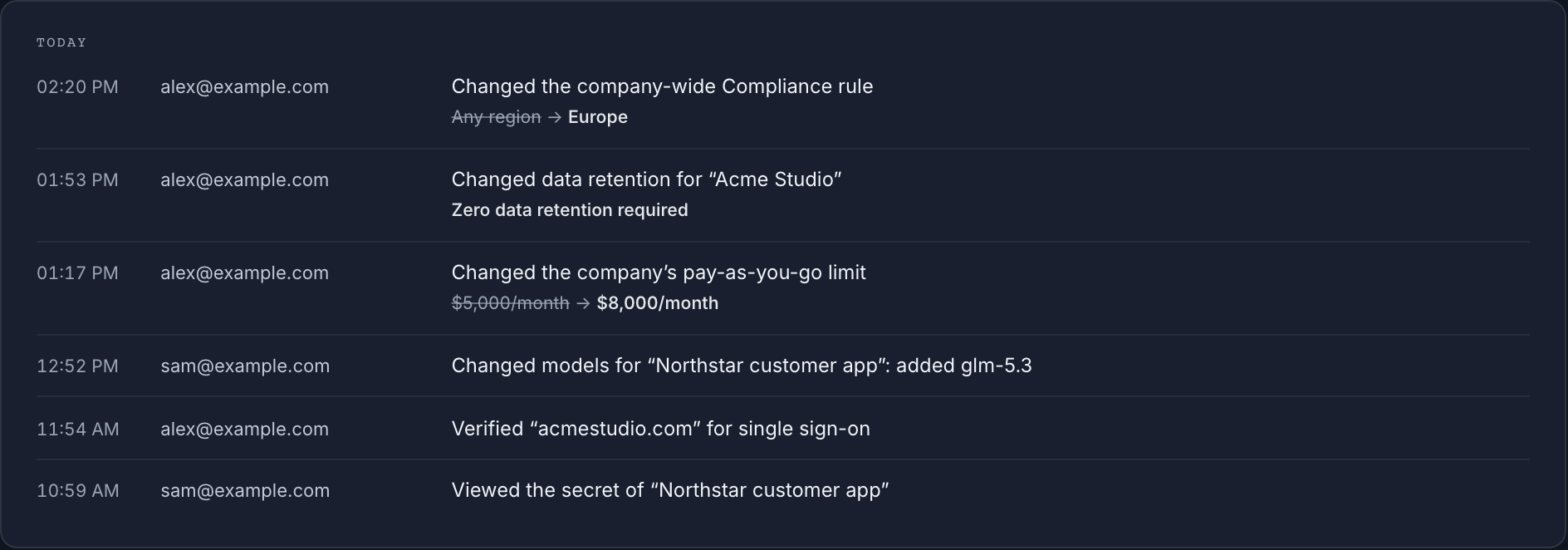
| Accountability and traceability | Every admin change is recorded with before and after values. Export a record of every request showing the model, the provider that served it and the region rule in force, kept for 12 months. |
| Fixed, predictable spending | Every person and app gets a fixed monthly budget that never overruns, with spending caps per key and for the whole company. Stripe invoices carry the organization's name and VAT number. |
Set it up in an afternoon
Create the company account
Invite colleagues by email, organize them into teams, and give every person and every app its own key.
Set the Europe rule and zero data retention
Set both for the whole company. Teams and keys inherit them and can never switch them off underneath you.
Connect Microsoft Entra ID
People sign in with their work accounts, and employees use Claude Desktop and Claude Code with their Microsoft work account through our EU gateway.
Approve providers and models, then sign the DPA
Choose which inference providers and models each key may use, set the budgets, and sign the DPA in the dashboard.
Regulation references
The rules buyers in this sector check first, linked to the official text. They are references for your own assessment.
Links checked 9 November 2026.
Questions from IT, security and procurement
- Who is the supplier?
- Standard Compute AS, a Norwegian company (org. no. 938 498 806) based in Oslo. Our DPA is governed by Norwegian law.
- Can staff sign in with Microsoft Entra ID?
- Yes. Connect Microsoft Entra ID or any SAML identity provider so staff sign in with their work accounts, and anyone on your verified domain joins automatically.
- Can different departments get different models?
- Yes. Decide which models each key can use and organize people into teams. Rules set for the whole organization can only be narrowed by teams and keys.
- Is there a security review pack?
- Yes. The security review page covers the data processed and where, retention, sub-processors, the DPA, sign-in, access control and logs, with answers to common vendor questionnaire questions.
Read next
Other sectors
Create the company account, set the Europe rule and zero data retention, and your people can start the same day.