How to give employees access to Claude securely
Most companies already have Claude in three places at once: staff on personal accounts, developers with their own API keys, and a pilot on a Team plan. A secure rollout replaces all three with one route the company controls: people sign in with their work identity, the data terms are ones you have signed, every person has a limit, and use leaves a record.
The eight steps below work whichever vendor you choose. Facts about Anthropic's plans come from its own pricing, help and documentation pages.
Short answers
- What is the secure way to give employees Claude?
- Give access through a company account that people sign in to with single sign-on, under commercial terms with no training on your data, with a limit per person and an audit record. Then close the personal-account path, so the company route is the only one in use.
- Which Claude plans include SSO?
- Claude Team and Claude Enterprise both include single sign-on, with Anthropic setup guides for Microsoft Entra ID and Okta. SCIM provisioning and audit logs are on Enterprise (claude.com/pricing).
- Does Anthropic train on company data?
- Anthropic does not train on inputs and outputs from its commercial products by default, which covers Team, Enterprise and the API (Anthropic privacy center).
Five decisions to make before the rollout
Write the answer to each one down before anyone gets access. Most rollout problems come from making these choices by default.
| Decision | Options | What it changes |
|---|---|---|
| How people reach Claude | Options: Claude Team or Enterprise seats; API keys from the Claude Console; Claude on Amazon Bedrock, Google Cloud or Microsoft Foundry; an AI gateway in front of any of these | What it changes: Seats bundle chat, Claude Code and Claude Desktop with a per-seat allowance. The API and cloud routes bill per token, and identity, limits and records are yours to add. |
| Identity | Options: SAML single sign-on from your identity provider, with or without SCIM | What it changes: Without SCIM, joiners and leavers are manual work. Shared API keys make every later step impossible: no per-person limit, no attribution, no clean offboarding. |
| Data terms | Options: Anthropic's commercial terms and DPA, your cloud provider's terms, or a gateway's DPA and sub-processor list | What it changes: Decides retention, training, breach notice and who your sub-processors are. |
| Where processing happens | Options: Global, US only, or Europe through a cloud provider or gateway | What it changes: Matters for personal data under GDPR. See how to use Claude in Europe under GDPR. |
| Spend | Options: The seat allowance, usage credits with spend limits, or a budget per key | What it changes: Decides whether heavy users stop at a window, keep going at API rates, or stop at a fixed monthly amount. |
Give employees Claude in eight steps
Steps one and two take a week. The rest can run in parallel once the route is chosen.
Find the use that already exists
Ask finance for card and expense lines from Anthropic and Claude, check your proxy or DNS logs for
claude.aiandapi.anthropic.com, and list who already holds API keys in the Claude Console. Ask teams what they use Claude for.This tells you which workflows the company route has to cover on day one. If it covers fewer, people stay on their personal accounts.
Classify the data people will send
Agree on three or four classes, for example public, internal, confidential and personal data, and decide which classes each route may carry. Source code, customer records and contracts are the usual sensitive cases.
Personal data brings GDPR obligations: a processor agreement, a known processing location and an entry in your records of processing.
Choose the access route
Claude Team costs $20 per Standard seat a month billed annually ($25 monthly) and $100 per Premium seat ($125 monthly), for 2 to 150 seats. Claude Enterprise costs $20 per seat a month billed annually with a 20-seat minimum, plus usage at API rates (claude.com/pricing).
Each Team member has a five-hour and a weekly usage limit that can't be pooled. Developers who run Claude Code all day reach those limits first, so price their seats separately from chat users. Anthropic puts the average Claude Code cost at about $13 per developer per active day (Claude Code costs).
Connect your identity provider
Set up SAML single sign-on from Microsoft Entra ID, Okta or another provider, and on Enterprise turn on SCIM so access follows your directory groups. Test with an ordinary member account before you enable it for everyone.
For Claude Code, pin sign-in to your organization in managed settings.
forceLoginMethodrestricts the login method andforceLoginOrgUUIDpins claude.ai logins to your organization, so a developer's personal account is refused (Claude Code admin setup).{ "forceLoginMethod": "claudeai", "forceLoginOrgUUID": "YOUR_ORGANIZATION_UUID", "permissions": { "disableBypassPermissionsMode": "disable" } }managed-settings.json for claude.ai sign-in Set retention and training terms
Enterprise chat data is kept until an admin sets a retention period, and the shortest period is 30 days (retention controls). Zero data retention covers eligible APIs and Claude Code on Enterprise, with Anthropic's approval (zero data retention).
Sign the vendor's DPA, file it with your vendor records and note the retention period you chose.
Put a limit on every person
On Team and Enterprise the seat allowance is the default ceiling. Usage credits let people continue past it, with spend limits at organization, group or member level. On the Claude Console, workspaces carry spend limits. On Bedrock, Google Cloud and Foundry, your cloud's budget controls apply (Claude Code costs).
Decide what gets recorded
Enterprise includes audit logs. For Claude Code, OpenTelemetry export sends per-user token, cost and tool metrics to your own monitoring on every provider (monitoring usage). Decide who reviews the records and how long you keep them.
Close the personal-account path
Publish a one-paragraph policy: which route is approved, for which data classes, and where to ask for access. Announce the company route before you block anything, or people move their use to tools you can't see.
Then enforce it. In Claude Code, managed settings pin the login as in step four, and
allowedProviderslimits which API providers a machine may use. On the network, your proxy can allow your company's route and block the rest.
Where Standard Compute does these steps for you
Standard Compute is one company account for Claude, GPT, Gemini and open models. Here is how it covers the steps above.
| Step | What Standard Compute does |
|---|---|
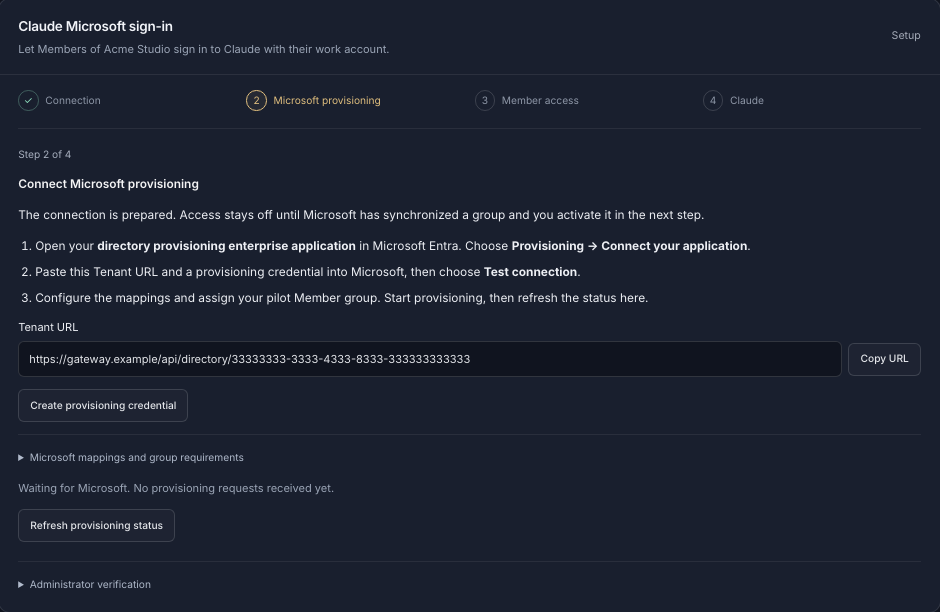
| Identity | What Standard Compute does: Connect Microsoft Entra ID or any SAML identity provider so your people sign in to Standard Compute with their work accounts. Anyone on your verified domain joins your company automatically. Employees sign in to Claude Desktop and Claude Code with their Microsoft work account, through our EU gateway, so there are no API keys to hand out. Access follows your Microsoft Entra groups through SCIM provisioning. |
| Data terms | What Standard Compute does: Sign our Data Processing Agreement in the dashboard. It commits us to no training on your data, no retention of your content, and breach notification within 72 hours. Standard Compute never trains on your prompts or outputs. With a region rule or zero retention turned on, every request goes only to providers that commit not to train on it. |
| Processing location | What Standard Compute does: Set a Europe rule for your company, a team or a single key, and every request, including retries and fallbacks, is served only by approved European inference endpoints. If no European endpoint can serve it, the request is refused before your prompt is sent. |
| A limit per person | What Standard Compute does: Every person and app gets a fixed monthly budget, and you can set spending caps per key and for the whole company. When a key reaches its budget it stops, unless you turn on top-off from a prepaid company balance for keys that must keep running. |
| Records | What Standard Compute does: Every admin change is recorded with before and after values, and you can export a record of every request showing the model, the provider that served it and the region rule in force, kept for 12 months. |
| Usage windows | What Standard Compute does: Claude Code and Claude Desktop run with no five-hour or weekly windows: each key runs until its monthly budget is used. Claude is served across several clouds, so one provider's quota or outage doesn't stop your work. |
Questions from IT, security and finance
- Can employees use Claude without us handing out API keys?
- Yes. On Team and Enterprise people sign in with SSO. With Standard Compute, employees sign in to Claude Desktop and Claude Code with their Microsoft work account, through our EU gateway, so there are no API keys to hand out.
- How do we stop developers using personal Claude accounts with company code?
- Give them a company route first, then pin Claude Code's login in managed settings with
forceLoginOrgUUID, or point every machine at your gateway withallowedProvidersset tocustomEndpoint. Managed settings take precedence over anything a developer sets locally. - Is Claude Team enough for a company of 50 people?
- Team covers 2 to 150 seats and includes SSO. SCIM provisioning and audit logs are on Enterprise, so if you need joiners and leavers handled from your directory, or an audit log, plan for Enterprise or a gateway that provides them.
- What does secure Claude access cost?
- Seats start at $20 a month billed annually. For developers, Anthropic puts Claude Code at about $13 per active day and $150 to $250 per developer per month on average across enterprise deployments.
- Where does our data go with Standard Compute?
- Your account and usage records are stored in Frankfurt, Germany, and our EU gateway runs in Finland. Request records hold metadata only (model, provider, tokens, cost and status), never your prompts or outputs.
Related pages
- SSO for AI tools: Microsoft Entra ID and Claude work-account sign-in
- AI governance and spend control: budgets, allow-lists and audit
- Claude Enterprise alternative for Claude Code and agents
- Claude rate limits for teams, plan by plan
- Security review pack for your vendor assessment
- Standard Compute for companies: the enterprise overview
Sources, checked on 7 November 2026
- Claude plans and pricing
- What is the Team plan?
- What is the Enterprise plan?
- Claude SSO setup: Microsoft Entra ID
- Custom data retention controls for Enterprise plans
- Which products zero data retention applies to
- Is my data used for model training?
- Claude Code: set up Claude Code for your organization
- Claude Code: manage costs effectively
- Claude Code: monitoring usage with OpenTelemetry