How to roll out Claude Code to a whole engineering team
A Claude Code rollout is three jobs. Choose how it signs in and bills, push one policy file to every machine, and measure what it costs before you widen the pilot. Anthropic's own admin guide covers each part; this page puts them in order and adds the decisions it leaves to you.
Short answers
- How do you enforce Claude Code settings on every laptop?
- Deliver managed settings: from the claude.ai admin console on Team or Enterprise, through an MDM plist or registry policy, or as a managed-settings.json file in a system directory. Managed settings take precedence over user and project settings (Claude Code admin setup).
- What does Claude Code cost per developer?
- Anthropic reports an average of about $13 per developer per active day and $150 to $250 per developer per month across enterprise deployments, with 90% of users below $30 per active day (Claude Code costs).
- Which provider should we use?
- Anthropic recommends Claude for Teams or Enterprise by default, the Claude Console for API-first teams, and Amazon Bedrock, Google Cloud or Microsoft Foundry when you want that cloud's compliance controls and billing.
Choose how Claude Code signs in and bills
The provider decides billing, the limits developers meet and some features. Cloud sessions, Code Review, Remote Control and the Chrome extension need a claude.ai account and aren't available through Console keys or cloud credentials alone.
| Provider | Choose it when | Limits and billing |
|---|---|---|
| Claude for Teams or Enterprise | Choose it when: You want Claude Code and claude.ai under one per-seat subscription with no infrastructure to run | Limits and billing: Per-seat allowance on a five-hour and a weekly window, shared with chat. Usage credits continue past it with spend limits. |
| Claude Console | Choose it when: You are API-first or want pay-as-you-go billing | Limits and billing: Per token. Workspace spend limits and workspace rate limits. |
| Amazon Bedrock, Google Cloud, Microsoft Foundry | Choose it when: You want that cloud's existing compliance controls and billing | Limits and billing: Per token on your cloud bill. Spend controls live in the cloud's billing console. |
| An LLM gateway | Choose it when: You want one endpoint, a credential per developer, budgets and request logs in one place | Limits and billing: Whatever the gateway charges. Anthropic notes the gateway becomes infrastructure you keep current as Claude Code changes. |
Provider descriptions are Anthropic's, from the Claude Code admin setup and LLM gateway pages.
Roll out Claude Code in eight steps
Plan two weeks for the pilot and one to two weeks for the policy work before the wide rollout.
Run a two-week pilot with five to ten developers
Pick developers from different teams and codebases, including one skeptic. Ask each to keep a short log of tasks that worked and tasks that didn't. Anthropic advises starting with a small pilot group to establish a cost baseline before wider rollout.
Choose the provider
Use the table above. If developers will run Claude Code for most of the day, compare the seat windows with per-token billing using your pilot numbers. The window is what stops a developer mid-task.
Write the managed policy
Start with three controls. Deny reads of secrets with
permissions.deny, stop anyone skipping permission prompts withpermissions.disableBypassPermissionsMode, and turn on sandboxing with a network domain allow-list.Anthropic points out that denying the WebFetch tool doesn't stop
curlif Bash is allowed. The sandbox closes that gap at the operating-system level (admin setup).{ "permissions": { "deny": ["Read(./.env)", "Read(./.env.*)", "Read(./secrets/**)"], "disableBypassPermissionsMode": "disable" }, "sandbox": { "enabled": true, "network": { "allowedDomains": ["github.com", "registry.npmjs.org", "pypi.org"] } } }A starting managed-settings.json Deliver the policy to every machine
Server-managed settings from the claude.ai admin console reach Team and Enterprise users at startup and refresh hourly. Otherwise use the MDM plist on macOS (
com.anthropic.claudecode), theHKLM\SOFTWARE\Policies\ClaudeCoderegistry key on Windows, or a file at/Library/Application Support/ClaudeCode/managed-settings.jsonon macOS,/etc/claude-code/managed-settings.jsonon Linux andC:\Program Files\ClaudeCode\managed-settings.jsonon Windows.The per-user Windows registry key (HKCU) is writable without admin rights, so treat it as a default and enforce through HKLM.
Pin how developers sign in
On claude.ai seats, set
forceLoginMethodandforceLoginOrgUUIDso only your organization's accounts work. When these are set, sessions that authenticate with an API key, an auth token orapiKeyHelperare blocked at startup.On a gateway, use
allowedProviders: ["customEndpoint"]instead, with the gateway'sANTHROPIC_BASE_URLin the same file. Claude Code then refuses a session pointed anywhere else, including Anthropic directly or a developer's own proxy (LLM gateways).Commit shared settings to each repository
Put team permissions, hooks and the environment a project needs in
.claude/settings.jsonand commit it. KeepCLAUDE.mdshort: Anthropic suggests under 200 lines, with specialist instructions moved into skills that load only when used (costs).Set rate and spend limits before the wide rollout
On the Console, Anthropic suggests 50,000 to 75,000 tokens per minute per user for 20 to 50 users, 25,000 to 35,000 for 50 to 100 users and 15,000 to 20,000 for 100 to 500 users, because fewer people use it at the same time as the team grows. A workspace rate limit on the Claude Code workspace protects your other production traffic.
On seats, turn on usage credits only with a spend limit at organization, group or member level.
Monitor, then widen in waves
Turn on OpenTelemetry export for per-user tokens, cost and tool activity on every provider (monitoring usage). Have each new developer run
/statusand check that the Setting sources line shows your managed settings. Add one team a week and compare its cost with the pilot baseline.
Where Standard Compute does these steps for you
Standard Compute sits where the gateway sits in the table above, as a managed service with nothing to host. Claude Code connects with one base URL in your managed settings.
| Step | What Standard Compute does |
|---|---|
| Provider and limits | What Standard Compute does: Claude Code and Claude Desktop run with no five-hour or weekly windows: each key runs until its monthly budget is used. Claude is served across several clouds, so one provider's quota or outage doesn't stop your work. |
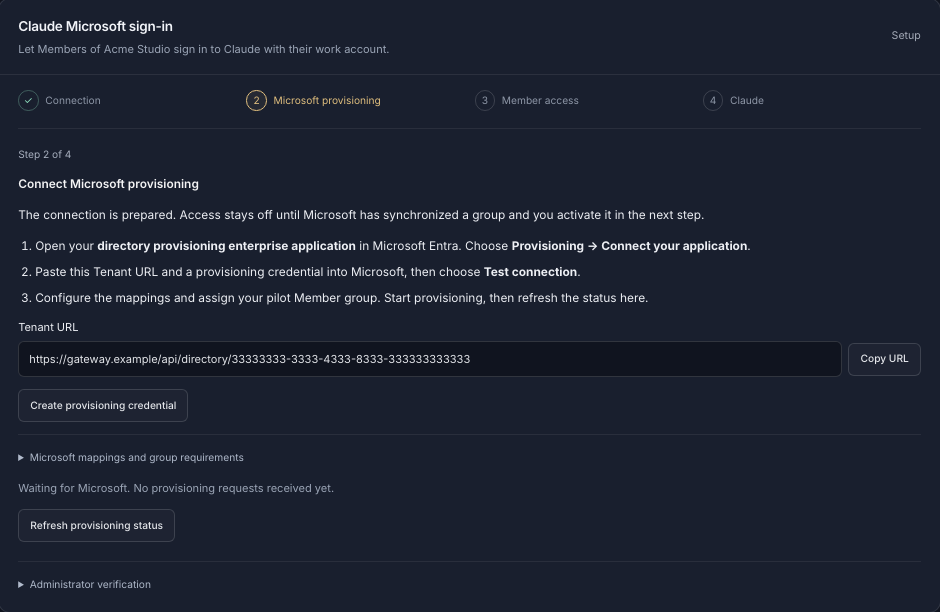
| Sign-in | What Standard Compute does: Employees sign in to Claude Desktop and Claude Code with their Microsoft work account, through our EU gateway, so there are no API keys to hand out. Access follows your Microsoft Entra groups through SCIM provisioning. |
| A credential per developer | What Standard Compute does: Organize your company into teams, invite colleagues by email, and give every person and every app its own key, all under one company account. |
| Spend limits | What Standard Compute does: Every person and app gets a fixed monthly budget, and you can set spending caps per key and for the whole company. When a key reaches its budget it stops, unless you turn on top-off from a prepaid company balance for keys that must keep running. |
| Models | What Standard Compute does: Decide which models each key can use, so every app and every team member gets exactly the models you approve. |
| Records | What Standard Compute does: Every admin change is recorded with before and after values, and you can export a record of every request showing the model, the provider that served it and the region rule in force, kept for 12 months. |
| Outages | What Standard Compute does: If a provider goes down, your request fails over to another approved provider of the same model automatically, without leaving your region or provider rules. |
// managed-settings.json, delivered by MDM or to
// /Library/Application Support/ClaudeCode/ (macOS)
// /etc/claude-code/ (Linux)  C:\Program Files\ClaudeCode\ (Windows)
{
  "env": {
    "ANTHROPIC_BASE_URL": "https://eu.stdcmpt.com",
    "ANTHROPIC_MODEL": "anthropic/claude-sonnet-5.5",
    "ANTHROPIC_DEFAULT_OPUS_MODEL": "anthropic/claude-opus-5.5",
    "ANTHROPIC_DEFAULT_SONNET_MODEL": "anthropic/claude-sonnet-5.5",
    "ANTHROPIC_DEFAULT_HAIKU_MODEL": "anthropic/claude-haiku-5.5"
  },
  "allowedProviders": ["customEndpoint"]
}
// Each developer's own key reaches the machine through your
// secrets tooling as ANTHROPIC_AUTH_TOKEN.Questions from IT, security and finance
- Can we roll out Claude Code without Team or Enterprise seats?
- Yes. Claude Code also runs on Claude Console API keys, Amazon Bedrock, Google Cloud, Microsoft Foundry and LLM gateways. Cloud sessions, Code Review, Remote Control and the Chrome extension need a claude.ai account.
- Can developers override the company settings?
- Not for managed keys. Managed settings take precedence over user, project and command-line settings. List settings such as
permissions.denymerge across sources, so developers can add entries but not remove yours. - Why do developers on Team seats hit limits?
- Each seat has a five-hour and a weekly window shared with chat, and a long Claude Code session uses far more than a day of chat. Usage credits let a developer continue past the window at API rates.
- How do we connect Claude Code to Standard Compute?
- Set
ANTHROPIC_BASE_URLtohttps://eu.stdcmpt.comand give each developer their own key asANTHROPIC_AUTH_TOKEN, ideally through managed settings and your secrets tooling. Claude Code then runs with no five-hour or weekly windows, until the key's monthly budget is used.
Related pages
- Claude rate limits for teams, plan by plan
- AI cost calculator for teams: seats, API and Standard Compute side by side
- SSO for AI tools: Microsoft Entra ID and Claude work-account sign-in
- AI governance and spend control: budgets, allow-lists and audit
- Claude Enterprise alternative for Claude Code and agents
- Amazon Bedrock Claude quotas and rate limits
- Standard Compute for companies: the enterprise overview
Sources, checked on 7 November 2026
- Claude Code: set up Claude Code for your organization
- Claude Code: settings files and precedence
- Claude Code: deploy managed settings
- Claude Code: configure permissions
- Claude Code: sandboxing
- Claude Code: LLM gateways
- Claude Code: manage costs effectively
- Claude Code: monitoring usage with OpenTelemetry
- Use Claude Code with your Team or Enterprise plan
- Claude plans and pricing