How to control AI coding agent costs across teams
Coding agent spend varies widely from one developer to the next, and it moves with model choice, codebase size and habits such as leaving long sessions open. Teams that keep it under control do four things: attribute every request to a person, cap spend where the bill is created, send routine work to cheaper models, and report by team each month.
The figures below are Anthropic's, for Claude Code. The method applies to any coding agent.
Short answers
- How much do AI coding agents cost per developer?
- For Claude Code, Anthropic reports about $13 per developer per active day and $150 to $250 per developer per month across enterprise deployments, with 90% of users below $30 per active day (Claude Code costs).
- What is the fastest way to control the cost?
- Give every developer and every automation its own credential with a hard monthly cap. Without one credential per person you can't see who spends, and a cap on a shared key stops everyone at once.
- How do we charge AI costs back to teams?
- Attribute spend to people first, through per-user reports or a credential per person, then map people to teams from your directory and report monthly.
Three ways to pay for coding agents
Each model puts the cost ceiling in a different place. Choose deliberately, because it decides what a developer meets when they run out.
| Billing model | Where the ceiling is | Trade-off |
|---|---|---|
| Seats with a usage window | Where the ceiling is: A five-hour and a weekly allowance per seat | Trade-off: Predictable bill. Heavy users stop mid-task until the window resets, unless you add usage credits. |
| Pay per token | Where the ceiling is: Whatever caps you set: workspace spend limits, cloud budgets, gateway budgets | Trade-off: Scales with use. Without caps and attribution, one runaway agent shows up only on the invoice. |
| A budget per credential | Where the ceiling is: A fixed monthly amount per person or app | Trade-off: Predictable per person and nobody is stopped by a window. You size the budgets and review them. |
Control coding agent costs in seven steps
Steps one to three put a ceiling in place within a week. Steps four to seven bring the average down.
Give every developer and every automation its own credential
Shared keys hide who spends and make offboarding a key rotation for everyone. Anthropic's gateway guidance is to issue each developer their own credential, so usage is attributed to that developer and offboarding revokes one credential (LLM gateways). Give CI jobs and agents their own credentials too, so a loop in a pipeline can't eat a developer's budget.
Measure a baseline for two weeks
Record cost per developer per active day and the spread between the median and the heaviest users. On Team and Enterprise, the spend report in organization analytics shows estimated spend per user and per model with a CSV export. On the Console, the Claude Code dashboard and the Claude Code Analytics API report per user (costs).
Set hard caps where the bill is created
On seats, the allowance is the default ceiling, and usage credits come with spend limits at organization, group or member level. On the Console, set workspace spend limits and a workspace rate limit on the Claude Code workspace. On Bedrock, Google Cloud and Foundry, use your cloud's budget controls, or a gateway with spend limits per user.
Match the model to the task
Anthropic's advice: Sonnet handles most coding tasks well and costs less than Opus, so keep Opus for complex architecture and multi-step reasoning, and give simple subagent tasks a smaller model such as Haiku. Set the default model in managed settings so new sessions start on the cheaper one.
Watch multi-agent features. Anthropic says agent teams use about seven times the tokens of a standard session when teammates run in plan mode.
Cut wasted context
Most of the token bill is context sent again with every request. Ask developers to run
/clearbetween unrelated tasks, keepCLAUDE.mdunder about 200 lines, disable MCP servers they don't use, and filter long test and log output with hooks before Claude reads it (costs).Report by team every month
Join the per-user numbers with team membership from your directory and send each engineering manager one line per person: spend, active days and cost per active day. OpenTelemetry export gives you the same metrics in your own monitoring on every provider (monitoring usage).
Review the outliers weekly
High spend usually traces back to long sessions that were never cleared or to Opus left as the default. Talk to the person before you lower a cap; often the cost is buying real output and the budget should move.
Where Standard Compute does these steps for you
Standard Compute puts a credential, a budget and a record on every person and app, and lowers the cost of each step by routing.
| Step | What Standard Compute does |
|---|---|
| A credential per person and app | What Standard Compute does: Organize your company into teams, invite colleagues by email, and give every person and every app its own key, all under one company account. |
| Hard caps | What Standard Compute does: Every person and app gets a fixed monthly budget, and you can set spending caps per key and for the whole company. When a key reaches its budget it stops, unless you turn on top-off from a prepaid company balance for keys that must keep running. |
| The right model for each step | What Standard Compute does: A single API gives you frontier and open-source models, and it routes each step to the cheapest model that can do it and the cheapest provider fast enough to serve it. |
| No stalled developers | What Standard Compute does: Claude Code and Claude Desktop run with no five-hour or weekly windows: each key runs until its monthly budget is used. Claude is served across several clouds, so one provider's quota or outage doesn't stop your work. |
| Records for reporting | What Standard Compute does: Every admin change is recorded with before and after values, and you can export a record of every request showing the model, the provider that served it and the region rule in force, kept for 12 months. |
| Model choice per key | What Standard Compute does: Decide which models each key can use, so every app and every team member gets exactly the models you approve. |
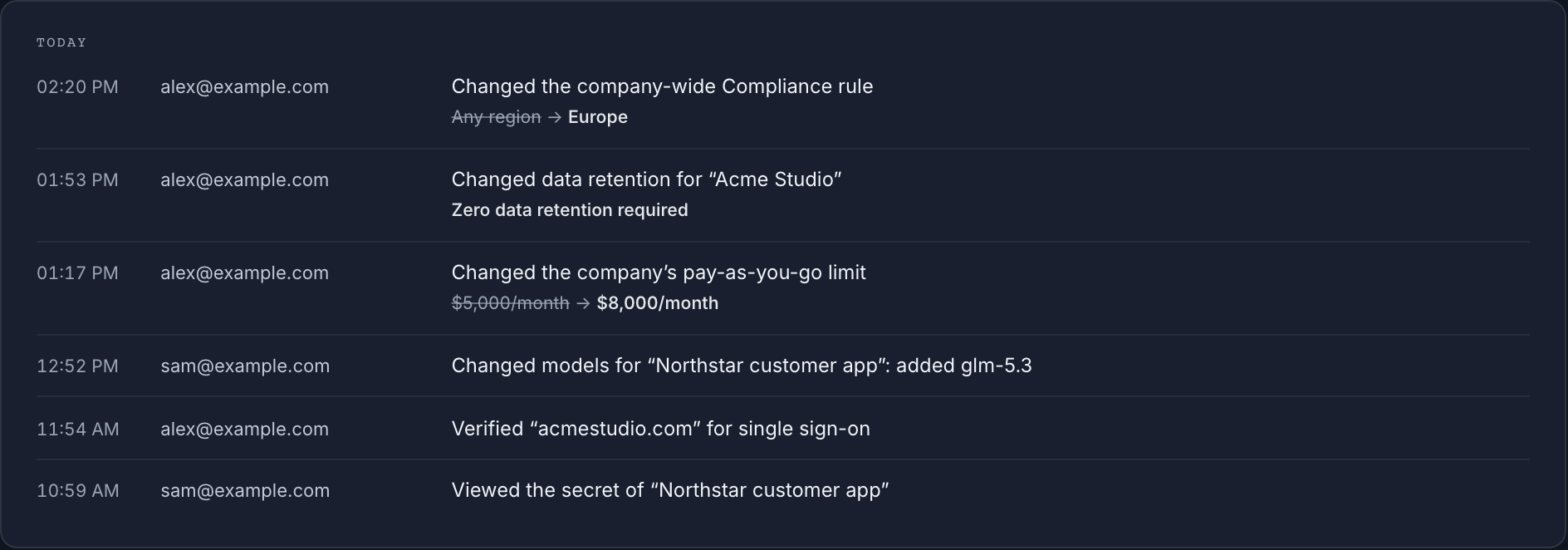
Plans are flat per person or app, with no per-token surprises, and Stripe invoices carry your company name and VAT number. Plans are on pricing.
Questions from IT, security and finance
- Can we set a budget for each developer?
- Yes. With Standard Compute every person and app gets a fixed monthly budget, and you can set spending caps per key and for the whole company.
- What happens when a developer reaches the budget?
- On Standard Compute the key stops at its budget. For keys that must keep running, turn on top-off and they continue on your prepaid company balance until the plan renews.
- Does routing to cheaper models lower quality?
- Standard Compute routes each step to the cheapest model that can do it and the cheapest provider fast enough to serve it, and you can pin a model per key when a task needs a specific one.
- Do these steps apply to Codex, Cursor and other agents?
- Yes. A credential per person, a baseline, hard caps, model choice and monthly reporting work for any coding agent. The setting names differ by tool.
Related pages
- AI governance and spend control: budgets, allow-lists and audit
- AI cost allocation and chargeback by team, project or client
- AI cost calculator for teams: seats, API and Standard Compute side by side
- Claude rate limits for teams, plan by plan
- Standard Compute for companies: the enterprise overview
- Claude Enterprise alternative for Claude Code and agents
- SSO for AI tools: Microsoft Entra ID and Claude work-account sign-in
- Security review pack for your vendor assessment